
On November 10, OpenAI opened a beta that lets eligible US businesses claim a profile inside ChatGPT and launch their own customer-facing agent there, according to Unite.AI’s report on Businesses in ChatGPT. That’s a useful signal. AI agents for business are no longer a lab experiment for big tech companies; they’re turning into something a 10-person online store can switch on. The harder question is whether you should, and where an agent actually earns its keep.
This guide explains what AI agents are in plain English, where they work well for small and mid-sized businesses, what they cost, and when you’re better off with a simpler tool.
AI agents for business are software assistants that take a goal, plan the steps, and carry them out across your tools with limited supervision. Unlike a chatbot that only answers questions, an agent can look up records, update systems and hand off to a person. Small businesses get the most value starting with one narrow, repetitive workflow, not a company-wide rollout.

What is an AI agent for business?
An AI agent is a program built on a large language model that can decide what to do next, use tools (email, a CRM, a calendar, a database) and keep working toward a goal until it’s done or needs help. The “agent” part is the decision-making loop. It reads a situation, picks an action, checks the result, and repeats.
Here’s a simple example. A roofing company gets a quote request through its website at 9 p.m. A basic form just emails the owner. A chatbot might answer “we’ll call you tomorrow.” An agent can ask the visitor for the address and roof type, check the estimator’s calendar, offer two inspection slots, book one, create the lead in the CRM and text the estimator a summary. The owner wakes up to a booked appointment instead of a cold lead.
We cover the difference in more depth in our guide to AI agents vs. chatbots, but the short version is this: chatbots talk, automations follow fixed rules, and agents decide and act.
How do AI agents work?
Most business agents follow the same five-step loop, whichever platform they’re built on.
- Goal. Something triggers the agent: a new email, a form submission, a chat message or a scheduled time.
- Plan. The model works out which steps it needs, based on its instructions and your business rules.
- Act. It calls tools it has been given permission to use, such as looking up an order, drafting a reply or adding a row to a sheet.
- Check. It reviews the result. If something is missing or risky, it asks a person instead of guessing.
- Report. It logs what it did, so you can audit every action later.
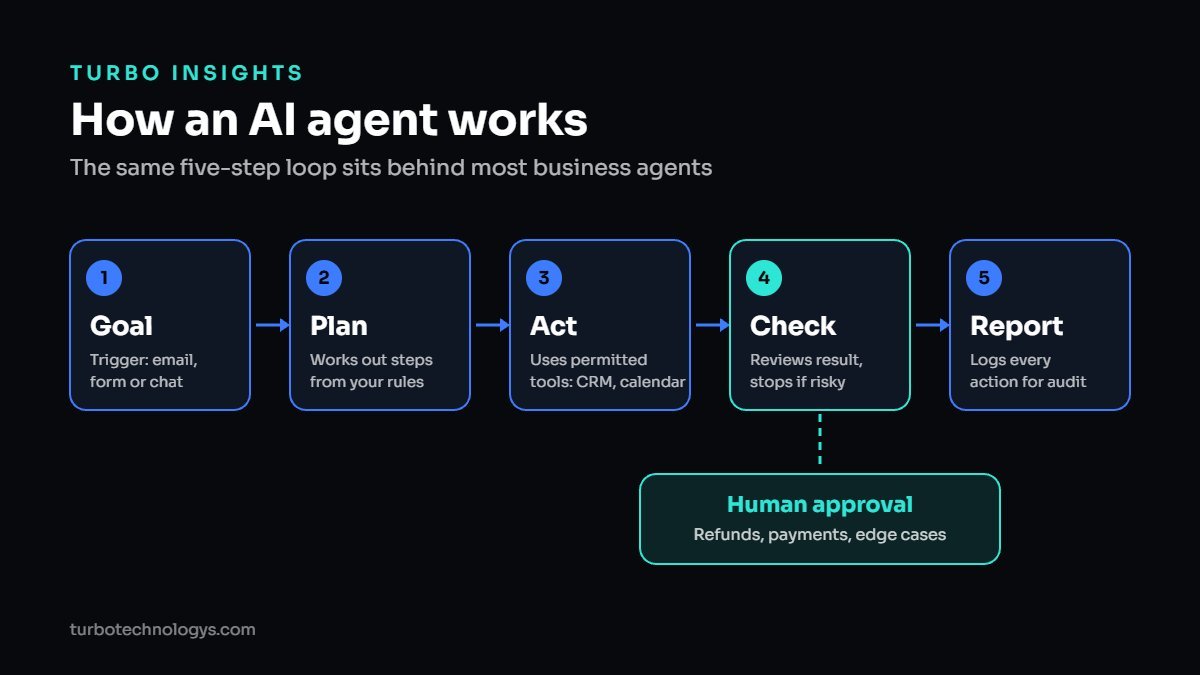
The part people underestimate is step four. A well-built agent knows its limits. If a customer asks for a refund above a set amount, or a lead mentions a legal issue, the agent should stop and hand over. That’s a design decision you make up front, not something the model figures out on its own.
How are AI agents different from chatbots and automation?
Business owners often get pitched all three as “AI.” They’re different tools with different costs and risks. This comparison is how we’d explain it to a client deciding between them.
| Rule-based automation | AI chatbot | AI agent | |
|---|---|---|---|
| What it does | Runs fixed if-this-then-that steps | Answers questions in conversation | Decides on steps and takes actions across tools |
| Handles messy input? | No, breaks on anything unexpected | Yes, for questions | Yes, for questions and tasks |
| Takes actions in your systems? | Yes, but only the ones you scripted | Rarely, usually just answers | Yes, within the permissions you set |
| Best for | Invoices, data syncing, notifications | FAQs, website support, pre-sales questions | Lead intake, booking, order support, research tasks |
| Main risk | Silent failures when inputs change | Wrong or made-up answers | Wrong actions if guardrails are weak |
| Typical starting effort | Low | Low to medium | Medium |
A practical rule: if the task never changes, use plain automation. It’s cheaper and more predictable. Reach for an agent when the input is unpredictable (free-text emails, varied customer requests) but the outcome you want is clear.
What can AI agents for business actually do?
These are the uses where we see the clearest fit for small and mid-sized companies today. Each one is narrow, repetitive and easy to measure.
- Lead intake and qualification. The agent asks the right questions, scores the lead against your criteria, adds it to the CRM and routes hot leads to a salesperson right away.
- Appointment booking. A dental clinic or home service company lets the agent offer real open slots, confirm bookings and send reminders.
- Order and delivery questions. For an online store, the agent looks up order status, explains return rules and opens a return if it meets the policy.
- Inbox triage. The agent sorts incoming email, drafts replies to routine questions and flags the ones that need you.
- Back-office data work. It pulls figures from invoices or forms into a spreadsheet and checks for mismatches.
- Prospect research. A B2B agency uses an agent to gather public company details before outreach, which a person then reviews.
Notice what’s missing: anything involving big money, legal judgment or sensitive personal decisions. OpenAI’s own rules for its new business agents bar them from giving advice that legally requires a professional license, per the same Unite.AI report. That’s a good boundary to copy.
If you’re unsure where to begin, our guide on which business processes to automate first walks through how to rank your options by time saved and risk.
Are small businesses really using AI agents yet?
Fewer than the headlines suggest. The US Census Bureau’s Business Trends and Outlook Survey found that 19.8% of US businesses reported using AI as of early May 2026. Among firms with 250 or more employees it was 37%, while use among firms with fewer than 20 employees hadn’t changed significantly over the survey period.
The software you already pay for is moving faster than most owners. Gartner predicted that 40% of enterprise applications will include task-specific AI agents by the end of 2026, up from less than 5% in 2025. In practice, that means your CRM, help desk or accounting tool may soon offer a built-in agent whether you asked for one or not.
There’s a warning attached, too. Gartner also predicted that over 40% of agentic AI projects will be canceled by the end of 2027, pointing to rising costs, unclear business value and weak risk controls. For a small business, the lesson is simple: start with a measurable problem, not with the technology. For more on where adoption stands, see our look at small business AI adoption in 2026.

How much do AI agents for business cost?
There’s no single price, because you’re paying for three separate things: the platform, the AI usage and the setup work. Here’s how those break down.
| Cost component | What you pay for | What drives it up |
|---|---|---|
| Platform or license | The agent builder or the software that hosts the agent | More users, more agents, premium features |
| AI usage | Model calls per conversation or task, often sold as credits | High volume, long conversations, complex multi-step tasks |
| Setup and integration | Connecting the agent to your CRM, calendar, store or database, plus writing its rules | Older systems without APIs, many integrations, strict approval flows |
| Ongoing care | Monitoring, fixing edge cases, updating instructions as your business changes | Frequent policy or product changes, compliance requirements |
For a concrete reference point, Microsoft lists Copilot Studio credit packs at $200 per month for 25,000 Copilot Credits, with a pay-as-you-go option billed on usage. How far those credits go depends on what each agent does, so test with real traffic before you commit to a plan. OpenAI hasn’t published pricing for business agents in ChatGPT during the beta.
The honest answer for most small businesses: the setup and ongoing care usually matter more than the license. A cheap platform connected badly to your systems will cost you more in fixes and lost leads than a slightly pricier one done properly. Ask any provider to price all four lines above, not just the build.
Do you need an AI agent? A quick decision checklist
Run through these questions before you spend anything. If you answer “yes” to at least five, an agent is probably worth piloting.
- Does the same type of request come in at least dozens of times a week?
- Does the request arrive as free text (emails, chats, forms) rather than neat data?
- Can you write down what a “correct” outcome looks like in a few sentences?
- Does the work involve looking things up in, or updating, two or more systems?
- Are you losing money or leads because responses are slow, especially after hours?
- Can a mistake be caught and reversed without serious harm?
- Do your tools (CRM, calendar, store, help desk) offer integrations or an API?
- Is there a person who will own the agent and review its logs each week?
When NOT to build an agent: if the task is rare, if a wrong action could cost serious money or break a law, or if the process itself is a mess. An agent will copy a bad process faster, not fix it. Clean up the workflow first, then automate it.
How do you get started with AI agents for business?
Here’s a five-step plan that keeps risk low and makes results easy to judge.
- Pick one workflow. Choose the task that passed the checklist with the most volume, for example after-hours lead intake.
- Measure the baseline. Write down today’s numbers: response time, hours spent per week, leads lost. Without this you can’t tell if the agent helped.
- Set permissions and limits. Decide exactly which tools the agent can use, what it may never do and when it must hand over to a person.
- Run a supervised pilot. For two to four weeks, have the agent draft actions that a person approves. Fix the failure cases you find.
- Expand slowly. Once error rates are acceptable, let it act on its own for low-risk steps and keep approvals for the rest.
For guardrails, the free NIST AI Risk Management Framework is a solid reference, even for a small company. You don’t need to adopt it formally; use it as a checklist for data access, testing and human oversight.
You can build simple agents yourself on no-code platforms, or work with a partner. If you’re weighing outside help, our explainer on what an AI automation agency does covers the questions to ask. Turbo Technologies also offers AI agent development services for businesses that want an agent connected to their own systems, and business process automation services when plain automation is the better fit.
From the founder. I’ve been building B2B prospect lists and doing lead research since 2015, and the biggest leak I’ve seen in small businesses is never the tools. It’s slow follow-up. A lead that waits until the next morning often goes to whoever answered first. I work with AI tools every day, and my advice is to point your first agent at that gap: fast, accurate first responses. Leave the clever stuff for later.
Mussadiq Shahbaz, founder of Turbo Technologies
Key takeaways
- AI agents take a goal, plan steps and act across your tools; chatbots mostly answer, and automations follow fixed rules.
- The best first uses are narrow and frequent: lead intake, booking, order questions and inbox triage.
- Only about one in five US businesses reported using AI in spring 2026, so most small firms are still early.
- Budget for four cost lines: platform, AI usage, setup and ongoing care.
- Start with one workflow, a measured baseline and human approvals, then expand.
Not sure whether your first project should be an agent, a chatbot or simple automation? Tell us about the workflow and we’ll give you a straight answer on what fits.
Frequently asked questions
What are AI agents for business in simple terms?
They’re AI-powered assistants that can complete tasks, not just answer questions. You give an agent a goal, such as booking a qualified lead, and access to certain tools like your calendar and CRM. It then works out the steps, carries them out, checks the result and asks a person for help when something falls outside its rules.
Can a small business afford an AI agent?
Often, yes, if the agent targets one high-volume task. Costs come from the platform, AI usage, setup and ongoing maintenance. Built-in agents inside software you already use can be the cheapest start, while custom agents connected to several systems cost more to set up. Compare the total against the hours or leads the task currently costs you.
Are AI agents safe to use with customer data?
They can be, if you limit what they can access and do. Give each agent only the permissions its task needs, keep logs of every action, require human approval for refunds, payments or sensitive changes, and check the vendor’s data retention terms. Frameworks like the NIST AI Risk Management Framework offer a useful checklist for these controls.
Will AI agents replace my employees?
For most small businesses, agents take over repetitive slices of a job rather than whole roles. They handle first responses, data entry and routine lookups, which frees staff for sales calls, complex customer issues and quality checks. Someone still needs to own the agent, review its work and handle the cases it hands over.
How long does it take to set up an AI agent?
It depends on how many systems the agent connects to and how clear your process is. A simple agent on a no-code platform can be tested within days, while one linked to a CRM, calendar and store usually needs a supervised pilot of a few weeks before it runs on its own. A messy process adds time.